Saturday, 23 July 2016

Friday, 22 July 2016
Difference between hub and switch
Difference between hub and switch
Network Hub

A network hub is designed to connect computers to each other with no real understanding of what it is transferring. Typically, a network hub is used for a private network, one that does not have any connections to sources other than local computers (meaning, no Internet access). When a hub receives a packet of data from a connected device, it broadcasts that data packet to all other connected devices regardless of which one ends up being the final destination. Additionally, network bandwidth is split between all of the connected computers. So, the more computer that are connected, the less bandwidth that is available for each computer, which means slower connection speeds.
Network Switch
A network switch also connects computers to each other, like a hub. Where the switch differs from a hub is in the way it handles packets of data. When a switch receives a packet of data, it determines what computer or device the packet is intended for and sends it to that computer only. It does not broadcast the packet to all computers as a hub does which means bandwidth is not shared and makes the network much more efficient. For this reason alone, switches are usually preferred over a hub.
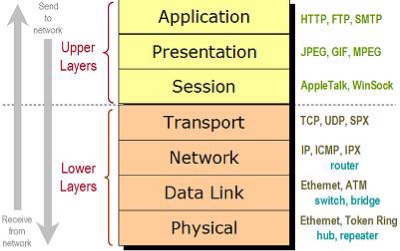
OSI Model layers
The OSI model open system interconnection model defines network to implement protocols in seven layer.

Thursday, 21 July 2016
Router vs Switch vs Hub: The Devices Defined
Router vs Switch vs Hub: The Devices Defined
The functions of the three devices — the router,
switch and hub — are all quite different from one another, even if at
times they are all integrated into a single device. Which device do you use
when?
What is a Router?
A device that
forwards data packets along networks. A router is
connected to at least two networks, commonly two LANs or WANs or a LAN and its ISP.s network.
Routers are located at gateways, the places where
two or more networks connect. Routers use headers and
forwarding tables to determine the best path for forwarding the packets, and
they use protocols such
as ICMP to
communicate with each other and configure the best route between any two hosts.
What is a Switch?
In networks,
a device that filters and forwards packets between LAN segments. Switches operate
at the data link layer (layer 2) and sometimes the network layer (layer 3) of the OSI
Reference Model and
therefore support any packet protocol. LANs that use
switches to join segments are called switched LANs or, in the
case of Ethernet networks, switched Ethernet LANs.
Finally, what is a Hub?
A
common connection point for devices in a network.
Hubs are commonly used to connect segments of aLAN. A hub contains multiple ports.
When a packet arrives at one port, it is copied to
the other ports so that all segments of the LAN can see all packets.
The Differences Between a
Router, Switch and Hub on the Network
Today
most routers have become something of a Swiss Army knife, combining the
features and functionality of a router and switch/hub into a single unit. So
conversations regarding these devices can be a bit misleading — especially to
someone new to computer networking.
The
functions of a router, hub and a switch are all quite different from one
another, even if at times they are all integrated into a single device.
Let's start with the hub and the switch since these two devices have similar
roles on the network.
Hub vs Switch: Similar
Roles
Each
serves as a central connection for all of your network equipment and handles a
data type known as frames. Frames carry your data. When a frame is received, it
is amplified and then transmitted on to the port of the destination PC. The big
difference between these two devices is in the method in which frames are being
delivered.
In a hub, a frame is passed along or "broadcast" to every one of its ports. It doesn't matter that the frame is only destined for one port. The hub has no way of distinguishing which port a frame should be sent to. Passing it along to every port ensures that it will reach its intended destination. This places a lot of traffic on the network and can lead to poor network response times.
Additionally, a 10/100Mbps hub must share its bandwidth with each and every one of its ports. So when only one PC is broadcasting, it will have access to the maximum available bandwidth. If, however, multiple PCs are broadcasting, then that bandwidth will need to be divided among all of those systems, which will degrade performance.
A switch, however, keeps a record of the MAC addresses of all the devices connected to it. With this information, a switch can identify which system is sitting on which port. So when a frame is received, it knows exactly which port to send it to, without significantly increasing network response times. And, unlike a hub, a 10/100Mbps switch will allocate a full 10/100Mbps to each of its ports. So regardless of the number of PCs transmitting, users will always have access to the maximum amount of bandwidth. It's for these reasons a switch is considered to be a much better choice than a hub.
In a hub, a frame is passed along or "broadcast" to every one of its ports. It doesn't matter that the frame is only destined for one port. The hub has no way of distinguishing which port a frame should be sent to. Passing it along to every port ensures that it will reach its intended destination. This places a lot of traffic on the network and can lead to poor network response times.
Additionally, a 10/100Mbps hub must share its bandwidth with each and every one of its ports. So when only one PC is broadcasting, it will have access to the maximum available bandwidth. If, however, multiple PCs are broadcasting, then that bandwidth will need to be divided among all of those systems, which will degrade performance.
A switch, however, keeps a record of the MAC addresses of all the devices connected to it. With this information, a switch can identify which system is sitting on which port. So when a frame is received, it knows exactly which port to send it to, without significantly increasing network response times. And, unlike a hub, a 10/100Mbps switch will allocate a full 10/100Mbps to each of its ports. So regardless of the number of PCs transmitting, users will always have access to the maximum amount of bandwidth. It's for these reasons a switch is considered to be a much better choice than a hub.
Routers are Completely
Different Devices
Routers
are completely different devices. Where a hub or switch is concerned with
transmitting frames, a router's job, as its name implies, is to route packets to other networks until that packet
ultimately reaches its destination. One of the key features of a packet is that
it not only contains data, but the destination address of where it's going.
A router is typically connected to at least two networks, commonly two Local Area Networks (LANs) or Wide Area Networks (WAN) or a LAN and its ISP's network . for example, your PC or workgroup and EarthLink. Routers are located at gateways, the places where two or more networks connect. Using headers and forwarding tables, routers determine the best path for forwarding the packets. Router use protocols such as ICMP to communicate with each other and configure the best route between any two hosts.
A router is typically connected to at least two networks, commonly two Local Area Networks (LANs) or Wide Area Networks (WAN) or a LAN and its ISP's network . for example, your PC or workgroup and EarthLink. Routers are located at gateways, the places where two or more networks connect. Using headers and forwarding tables, routers determine the best path for forwarding the packets. Router use protocols such as ICMP to communicate with each other and configure the best route between any two hosts.
Features of Integrated
Routers
Today,
a wide variety of services are integrated into most broadband routers. A router
will typically include a 4 - 8 port Ethernet switch (or hub) and a Network
Address Translator (NAT). In addition, they usually include a Dynamic Host
Configuration Protocol (DHCP) server, Domain Name Service (DNS) proxy server
and a hardware firewall to protect the LAN from malicious intrusion from the Internet.
All routers have a WAN Port that connects to a DSL or cable modem for broadband Internet service and the integrated switch allows users to easily create a LAN. This allows all the PCs on the LAN to have access to the Internet and Windows file and printer sharing services.
All routers have a WAN Port that connects to a DSL or cable modem for broadband Internet service and the integrated switch allows users to easily create a LAN. This allows all the PCs on the LAN to have access to the Internet and Windows file and printer sharing services.
Routers
might have a single WAN port and a single LAN port and are designed to connect
an existing LAN hub or switch to a WAN. Ethernet switches and hubs can be
connected to a router with multiple PC ports to expand a LAN. Depending on the
capabilities (kinds of available ports) of the router and the switches or hubs,
the connection between the router and switches/hubs may require either
straight-thru or crossover (null-modem) cables. Some routers even have USB ports, and more commonly, wireless access
points built into them.
Some of the more high-end or business class routers will also incorporate a serial port that can be connected to an external dial-up modem, which is useful as a backup in the event that the primary broadband connection goes down, as well as a built in LAN printer server and printer port.
Besides the inherent protection features provided by the NAT, many routers will also have a built-in, configurable, hardware-based firewall. Firewall capabilities can range from the very basic to quite sophisticated devices. Among the capabilities found on leading routers are those that permit configuring TCP/UDP ports for games, chat services, and the like, on the LAN behind the firewall.
So, in short, a hub glues together an Ethernet network segment, a switch can connect multiple Ethernet segments more efficiently and a router can do those functions plus route TCP/IP packets between multiple LANs and/or WANs; and much more of course.
Some of the more high-end or business class routers will also incorporate a serial port that can be connected to an external dial-up modem, which is useful as a backup in the event that the primary broadband connection goes down, as well as a built in LAN printer server and printer port.
Besides the inherent protection features provided by the NAT, many routers will also have a built-in, configurable, hardware-based firewall. Firewall capabilities can range from the very basic to quite sophisticated devices. Among the capabilities found on leading routers are those that permit configuring TCP/UDP ports for games, chat services, and the like, on the LAN behind the firewall.
So, in short, a hub glues together an Ethernet network segment, a switch can connect multiple Ethernet segments more efficiently and a router can do those functions plus route TCP/IP packets between multiple LANs and/or WANs; and much more of course.
Wednesday, 20 July 2016
5G technology
5G is the coming fifth-generation wireless broadband technology based on the IEEE 802.11ac standard.
5G will provide better speeds and coverage than the current 4G. 5G operates with a 5Ghz signal and is set to offer speeds of up to 1 Gb/s for tens of connections or tens of Mb/s for tens of thousands of connections. Huawei, a major player in the Chinese mobile market, believes 5G will provide speeds 100x faster than 4G LTE offers. 5G also increases network expandability up to hundreds of thousands of connections.
The signal technology of 5G has also been improved for greater coverage as well as spectral and signaling efficiency. These improvements stand to further enable changes like pervasive computing and the Internet of Things (IoT).
Although 5G is not scheduled for launch until 2020, some manufacturers are already incorporating elements of the coming standard's specifications into their
Products.

Network topology

Network Topology
Computers in a network have to be connected in some logical manner. The layout pattern of the interconnections between computers in a network is called network topology. You can think of topology as the virtual shape or structure of the network. Network topology is also referred to as 'network architecture.'
Devices on the network are referred to as 'nodes.' The most common nodes are computers and peripheral devices. Network topology is illustrated by showing these nodes and their connections using cables. There are a number of different types of network topologies, including point-to-point, bus, star, ring, mesh, tree and hybrid. Let's review these main types.
Point-to-Point
Point-to-point topology is the simplest of all the network topologies. The network consists of a direct link between two computers. This is faster and more reliable than other types of connections since there is a direct connection. The disadvantage is that it can only be used for small areas where computers are in close proximity.
Bus
Bus topology uses one main cable to which all nodes are directly connected. The main cable acts as a backbone for the network. One of the computers in the network typically acts as the computer server. The first advantage of bus topology is that it is easy to connect a computer or peripheral device. The second advantage is that the cable requirements are relatively small, resulting in lower cost.
One of the disadvantages is that if the main cable breaks, the entire network goes down. This type of network is also difficult to troubleshoot. For these reasons, this type of topology is not used for large networks, such as those covering an entire building.
Star
In star topology, each computer is connected to a central hub using a point-to-point connection. The central hub can be a computer server that manages the network, or it can be a much simpler device that only makes the connections between computers over the network possible.
Star topology is very popular because the startup costs are low. It is also easy to add new nodes to the network. The network is robust in the sense that if one connection between a computer and the hub fails, the other connections remain intact. If the central hub fails, however, the entire network goes down. It also requires more cable than bus topology and is, therefore, more expensive.
Ring
In ring topology, the computers in the network are connected in a circular fashion, and the data travels in one direction. Each computer is directly connected to the next computer, forming a single pathway for signals through the network. This type of network is easy to install and manage.
If there's a problem in the network, it is easy to pinpoint which connection is defective. It is also good for handling high-volume traffic over long distances since every computer can act as a booster of the signal. On the downside, adding computers to this type of network is more cumbersome, and if one single computer fails, the entire network goes down.
Mesh
Network topology is the arrangement of the various elements (links, nodes, etc.) of a computer network. Essentially, it is the topological structure of a network and may be depicted physically or logically
Monday, 18 July 2016
Difference between Data and information
Main difference:
The major difference between data and information is that data is raw material that is to be processed and information is the processed data.
Data VS Information
Data:
Data is the raw material that is to be processed for information or for collection of details. It is unorganized data or facts that are to be processed. Data is plain fact and it has to be processed for further information. Data is alone enough to get details and find the meaning of something. Data is the computers language. Data is useless unless it is processed or has been made into something. Data has no meaning when it has not been interpreted. Data is an unclear definition of words jumbled up to form one meaning of something. Data comes in figures, dates and numbers and is not processed.
Information:
Information is processed data. The data that can be made useful is known as information. Information is basically the data plus the meaning of what the data was collected for. Data does not depend upon information but information depends upon data. It cannot be generated without the help of data. Information is something that is being conveyed. Information is meaningful when data is gathered and meaning is generated. Information cannot be generated without the help of data. Information is the meaning that has been formed with the help of data and that meaning makes sense because of the data that has been collected against the word. Information is processed and comes in a meaningful form.

Subscribe to:
Posts (Atom)